
Choosing an Inference Engine on DGX Spark
llama.cpp vs vLLM vs TensorRT vs Ollama (and why I landed on llama.cpp)

TL;DR
The DGX Spark has enough unified RAM to load large LLMs, but using dense models makes everything slow. Before I realised the real bottleneck (MoE vs dense, covered in Part 2), I went deep into inference engines. Here’s how they compare on DGX Spark—and why I ultimately chose llama.cpp for daily use.
Why I Wanted Local Inference on DGX Spark
When I got the DGX Spark, my goal was to run large language models locally. But after setting up Ollama, I was curious to find that GPT-OSS:120B ran surprisingly fast, while Gemma3:27B was painfully slow. That inconsistency sent me down an exploration of inference engines.
My personal requirements for a local LLM inference setup:
A clean chat UI (like ChatGPT/Claude)
Support for agentic coding (Continue.dev etc.)
API endpoints for Python + apps
Ability to run multiple models concurrently (within ~128GB RAM)
Manageable model storage
Good performance: fast TTFT + stable token throughput
What I don’t need: multi-user scaling or production-grade throughput.
The Big Problem: Format Fragmentation
Every inference engine uses its own model format:
HuggingFace / PyTorch / vLLM / SGLang →
safetensors(large, high precision)llama.cpp →
GGUF(quantised, small)Ollama → blobs (wrapper around GGUF)
TensorRT →
onnx→ compiled to.plan/.trt(GPU-specific)
The duplication is real, running GPT-OSS:120B across Ollama + vLLM + llama.cpp would cost:
65GB (GGUF)
130GB (safetensors)
65GB (blob)
260GB for a single model, just because of format differences.
After a few weeks, I had already burned through nearly 1TB of storage. This is why choosing a single engine early matters.
Precision vs Size: Why GGUF Makes Sense for Spark
High-precision formats (like FP16 safetensors) deliver the best accuracy and (with the right hardware) the fastest inference—but their memory requirements are too high for many models. Quantised GGUF models trade a small amount of speed and accuracy for:
2-4x smaller file sizes
Ability to fit larger models entirely in GPU memory
Running multiple models concurrently within 128GB RAM
Good enough accuracy for experimentation
Fast loading in llama.cpp (especially with --no-mmap)
For single-user experimentation on Spark's unified memory architecture, quantization lets you run much larger models (120B vs 30B) that would otherwise exceed your memory budget. While the 120B quantized model will be slower than a smaller FP16 model, it may provide better results for complex tasks—and it's fast enough to be usable.
Inference Engine Comparisons on DGX Spark
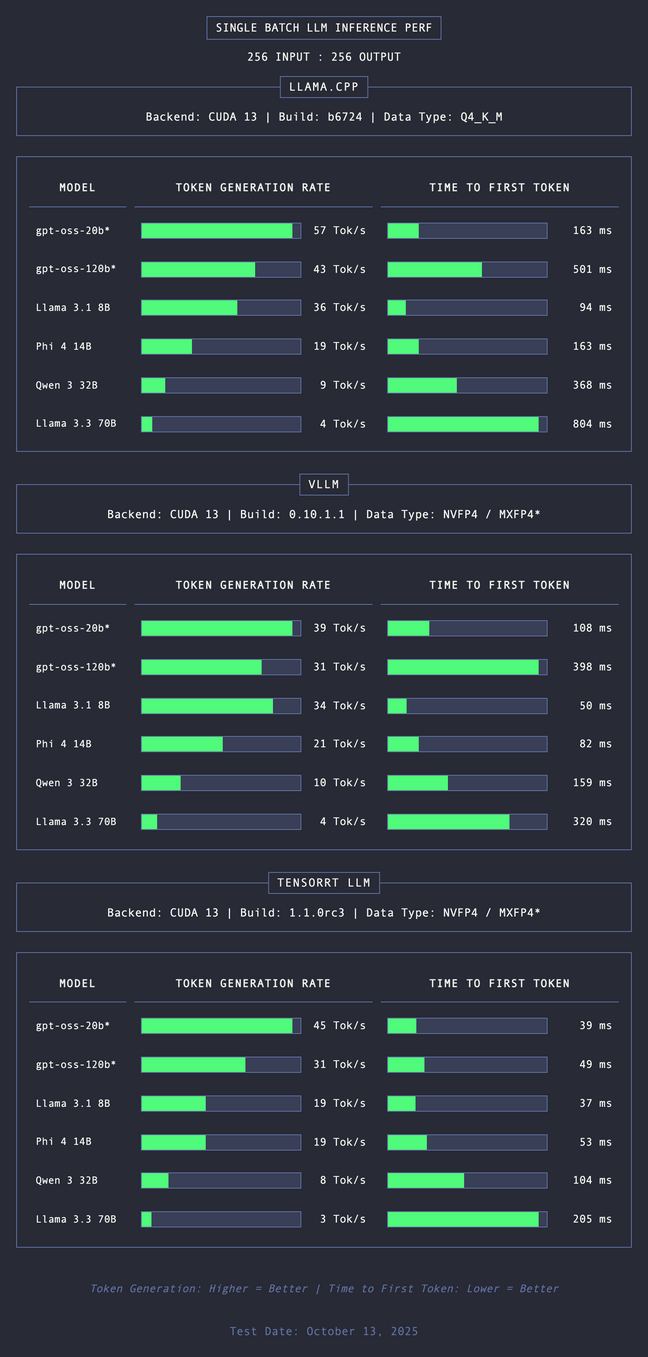
This review in the Register was the only inference comparison I’ve been able to find for llama.cpp, vLLM and TensorRT. As you can see below, they vary considerably in TTFT (time to first token) but less so for token generation rate.
vLLM
I started with vLLM but the container provided by NVIDIA didn’t work and I didn’t really want to get lost in debugging it. While this engine is designed for multi-user it’s overkill for single-person (me) workflows. And based on the Register’s benchmark, its performance is similar to llama.cpp.
TensorRT
In theory this engine should be fastest (lowest TTFT, high throughput) on NVIDIA GPUs. In practice:
Compiling GPT-OSS:120B took hours**.** I cancelled the build halfway.
There is limited model support
It’s harder to integrate (e.g., into Open WebUI)
The Register found its throughput to be worse than llama.cpp
Ollama
This is extremely convenient and ultra-simple to use but slightly slower than llama.cpp in my testing. There is less control than llama.cpp and fewer models available.
llama.cpp
The surprise winner. It’s marketed for consumer GPUs, but it’s optimised for NVIDIA with:
CUDA Graph support
Efficient GGUF loading
Fantastic single-user performance
Wide quantisation options (
Q8,Q6_K,Q4_K_M, etc.)Extremely simple to deploy
Strong open-source user community
Just released a new web UI for chatting with models
llama.cpp Benchmarks on DGX Spark
I tested a range of models via the llama.cpp UI. Some were painfully slow (I’m looking at you DeepSeek-Coder) and others were blazing fast for a similar number of model parameters - these were for the initial conversation and were not tested through to ‘terminal throughput’ with a full context window:
| Model | Speed |
| Qwen3-Coder-30B-A3B-Instruct Q4_K_M | 57–69 tok/s |
| GPT-OSS:20B MXFP4 | 60–63 tok/s |
| GPT-OSS:120B F16 (this is FP16 which explains why my speeds were a bit slower than the Register as they used MXFP4) | 35–37 tok/s |
| Gemma3 4B FP16 | 30–33 tok/s |
| Gemma Writer 9B Q8 (base model Gemma2) | 19–20 tok/s |
| Gemma3:27B Q4_0 | 13 tok/s |
| Qwenvergence 14B Q8 (base model Qwen2) | 12.6 tok/s |
| Creative-writer-32B Q5_K_L (base model Cohere) | 8 tok/s |
| DeepSeek-Coder-33B Q8 | 5.7 tok/s |
| Note: Different quantization levels (FP16, Q8, Q4) affect both size and speed—lower precision = smaller files but may impact performance. I tested these specific models because I had downloaded them for creative writing and coding prior to doing the benchmarking. |
Ollama was actually not that much slower than llama.cpp - about 3-4 fewer tokens per second for both GPT-OSS:120B and Gemma3:27B.
A fellow DGX forum member’s advice sealed it:
“If you’re the only user, llama.cpp will give you the best single-user performance without the overhead. Use vLLM only when llama.cpp doesn’t support a new architecture yet.”
My Setup Now
I’m now running:
llama.cpp as the main inference engine
The new llama.cpp web UI for a clean chat interface
Critical Parameters
The key parameters for optimising inference on a DGX Spark are:
Batch Size (
-b): this is the logical maximum batch size. The larger the batch size the faster your workload is processed by the model as it breaks the context into batches of this size (in tokens). However since these batches go through the forward pass, very large batch sizes can cause out-of-memory crashes during inference. I tried 8192 tokens for batch size and this did crash inference several times when coding. 4096 was more stable.UBatch Size (
-ub): Physical batch size for processing per forward pass. Setting this to the same as Batch size means processing the entire logical batch at once.Context Size (
-c): the context window for a LLM is the maximum number of tokens (a proxy for content) which the LLM can process. Once reached, a sliding window drops older context (excluding the system prompt), so the model ‘forgets’ - or in practice doesn’t see these tokens when generating text.A limiting factor for the DGX Spark in this scenario is memory bandwidth. The larger the context window, the more KV cache data must be read from memory for each token generated. As has been publicly shared the LPDDR5X memory which gives the Spark it’s capacity is slower (and more energy efficient) than standard GPU memory.
You will see a reduction in throughput as the context window fills up, until it reaches a terminal throughput rate once full. Even using flash attention (below), I found that this becomes a problem when doing token-intensive tasks, like coding. It does depend on what you are doing but for standard text generation For my Qwen3-Coder-30B Q4 setup, using a context window of 16,384 stabilized throughput around 20-25 tokens/second, while 32,768 stabilized around 15-17 tokens/second.
Number of GPU layers (
-ngl): max. number of layers to store in VRAM - setting this to 999 ensures you make best use of the Blackwell GPU - in my case the model is fully loaded onto the GPU.Flash attention (
--flash-attn on): this is a way to speed up Transformer based models (see more here).Turn off mmap (
--no-mmap): leaving mmap on is a known issue with the DGX Spark which increases model load times (in this example by five times). So turn it off.Use quantised KV caches:(
-ctk q4_0 -ctv q4_0)Unified KV buffer (
--kv-unified): uses a single buffer for the KV cache of all sequences.
My Working Configuration
# Example: Running GPT-OSS:120B on DGX Spark with llama.cpp
~/llama.cpp/build/bin/llama-server \
  -m ~/.cache/llama.cpp/gpt-oss-120b/unsloth_gpt-oss-120b-GGUF_gpt-oss-120b-F16.gguf \
  -c 16384 \
  --host 0.0.0.0 \
  --port 8005 \
  --jinja \
  -ub 2048 \
  -b 2048 \
  -ngl 999 \
  --flash-attn on \
  --no-mmap \
  -ctk q4_0 \
  -ctv q4_0 \
  --kv-unified
Conclusion and what next
For a single-user DGX Spark setup prioritising speed, experimentation, and storage efficiency, llama.cpp is an easy to use and performant inference engine. But there was still one mystery: Why were some big models extremely fast while others crawled?
The answer turned out to be more important than the engine choice itself. See my next blog post for more.


